Nobody wants to work on new software, therefore most of the businesses do not take their decision on ERP because they want good software. They arrive there, after the same set of repeats: sales in one system, inventory in another, finance working out of a separate accounting tool and by the last week of month someone is piecemealing all three together in excel, before anyone can feel confident enough to act on the numbers.
Quick Answer: Cloud ERP software is an enterprise resource planning system delivered via a provider's cloud-hosted servers and accessed over the internet versus installed on company-owned servers maintained in-house. It incorporates all the processes from finance, inventory, sales, purchasing, and HR under one roof with a single set of shared data, and where the provider manages the infrastructure components as well as updates and maintenance functions. The decision for an Indian business, is probably less cloud v/s on-premise, but if the system bills correctly under GST (Goods and Services Tax), hits e-invoices where necessary and aggregates numbers across branches without someone having to do that manually.
What Actually Changes When ERP Moves to the Cloud
When an organization chooses on-premises ERP, it buys servers, runs the software and makes its own in-house team - or a hired vendor - responsible for updates, backups and uptime. This responsibility gets moved to the provider with Cloud ERP. Employees log in online; the provider manages the underlying infrastructure, often without the company ever even giving it a second thought.
That change means a sales manager at one branch, an accountant at head office and an inventory manager somewhere else can all work off the same live data. Get a sale registered once; revenue, stock, and accounts are all up to date together - no one is re-entering the same transaction three times manually into separate systems.
How Does Cloud ERP Software Work?
Cloud ERP software operates on the premise that, rather than having to host the ERP application and sensitive business data on company-controlled servers in the company's own headquarters, those same servers sit inside of an infrastructure supported by a cloud technology provider.
Employees log in through an internet connection with the username and password assigned to them. This allows separate departments to work from the same base database, rather than having multiple copies of business data.
The basic flow looks like:
User → Internet → Cloud ERP Application → Centralized Database → Connected Business Modules
For example, if a sales employee enters an order in one system, that context can automatically flow into the related inventory workflow and billing and financial workflows without another employee cutting and pasting or entering data elsewhere.
The provider usually takes care of backend infrastructure, software upgrades, hardware maintenance, and backup, while the business is responsible for its users, workflows, permission and business data.
This is why Cloud ERP proves to be useful for companies that work in multi-site environments. The same system will be shared by a branch manager, finance team, as well as the business owner without needing to maintain an individual ERP for every location.
The specific workflow varies based on the ERP platform and the modules utilized by the business, but the underlying idea is constant: a single system, a unified data layer, fewer manual bridges across functions.
The Real Cost of Staying Disconnected
After all, vendor pages can only sell cloud ERP on price and ease of use - which, fair enough and even if it is why most organisations wind up regretting the wait. A number of disconnected systems will fail quietly. A retailer with Tally at each branch, despite having an Excel sheet that syncs and compares stock, won't know it's overstocked at one place but short on another until someone manually compares two files - typically after the mismatch has already lost you a sale or locked cash in unsold inventory.
Cloud ERP picks that up on the same day. Not because it has more intelligence, but rather the fact that the data was never separated in the first place.
What Cloud ERP Actually Manages
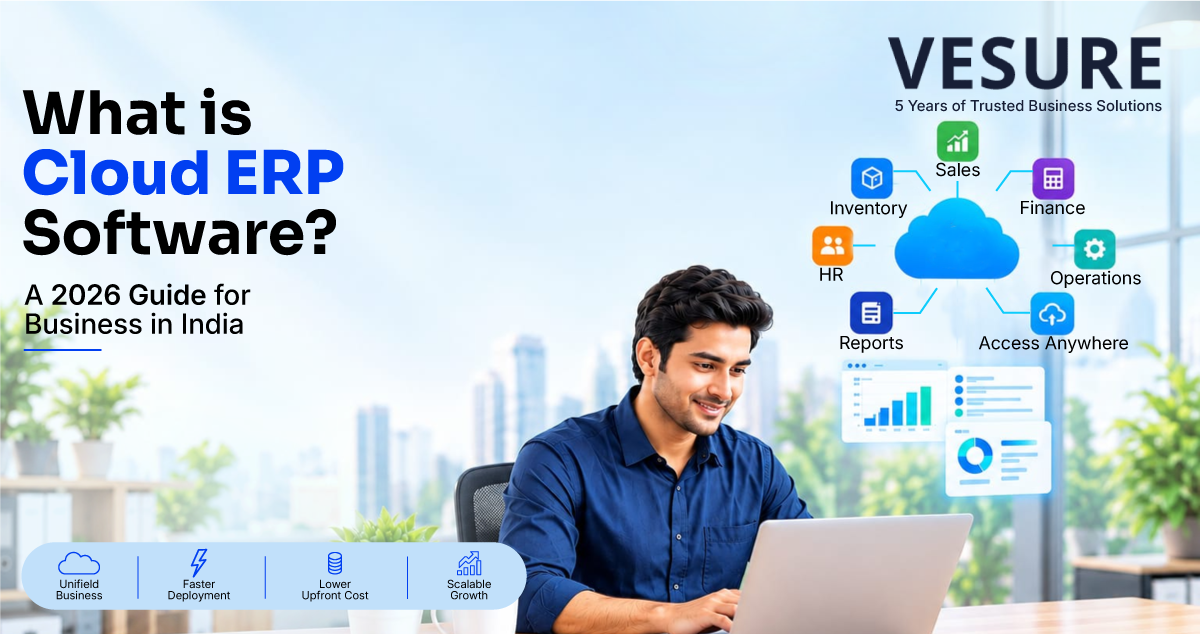
This is just to give you a basic idea about the modules which any cloud ERP usually connects.
Finance & accounting - account ledgers, invoices and accounting reconciliation
Sales and order management - quotations, order tracking, revenues
Inventory and ordering - stock levels, repeat ordering, purchase orders
HR and payroll - attendance and payroll processing
CRM - Managing customer records and history of interaction
Reporting and analytics - dashboards pulling everything above
Multi-location management - data collated on multiple branches or warehouses
Not all 7 modules are required from the beginning of each business. For retailers, these are maybe billing, inventory and finance. Manufacturers might primarily be concerned with production planning, and supply chain, on the other hand project-based businesses need project and workforce management including timesheet by date or project tracking. Service companies are an entirely distinct need. While packaging everything together seems like a brilliant idea, vendors offering packages can backfire causing enterprises to pay for modules they might not need anyway.
Cloud ERP Benefits
- Lower upfront cost. Shift from a large license-plus-hardware payment to subscription pricing
- Access from every location. Branch manager on a phone desktop, head-office desktop same live numbers and no email report wait.
- Scaling without new infrastructure.Purchasing additional servers is not a different sale; adding branches, locations, or new users should be simple increases to the configuration.
- The underlying businesses don't need to run. an update. Providers release new features and security patches only when it is convenient for them.
- One version of the truth. And sales, inventory and finance cease to churn out three numbers that need to be reconciled before anyone can make a call.
- Built-in disaster recovery. Instead of whichever one remembers to run them, backups and redundancy live with the provider.
None of that is free, though. Users, modules, implementation, customization and training still drives total cost - comparing vendors on the monthly subscription line alone is a great way to get surprised down the track.
Cloud ERP vs. On-Premise ERP
|
Factor |
Cloud ERP |
On-Premise ERP |
|
Deployment |
Hosted by the provider |
Installed on company infrastructure |
|
Upfront cost |
Lower - subscription-based |
Higher - hardware + licenses |
|
Maintenance & updates |
Provider-managed |
Handled internally |
|
Access |
Any location, any device |
Tied to company infrastructure |
|
Customization |
Configuration-level |
Deep, code-level control |
|
Best fit |
Growing, multi-branch businesses |
Large, highly customized, IT-heavy setups |
You could see how a business with a deeply set internal IT department and years of deep customization built up over time would have genuine cause to remain stuck. For the case of a growing business that wishes for faster deployment and to avoid babysitting infrastructure, this turns from an alternative we can discuss into a practical solution.
Types of Cloud ERP Deployment
Underneath it all, "Cloud ERP" doesn't mean one thing. So with all this variability between vendors, it is useful to know which model you are really buying before comparing vendor A and B:
- Multi-tenant SaaS - one software environment is shared by multiple customers and data are logically separated. Most inexpensive, quickest to implement (lots of SMBs land here!)
- Single-tenant SaaS - Dedicated per customer instance More control, higher cost.
- Private cloud - proprietary infrastructure independent to a single organization, typically selected when stricter data-residency needs exist.
- Hybrid - phased migration with some modules cloud-hosted, others on-premises.
A well-established vendor page skips around the fact that there is a difference. Others push a repackaged version of their old on-premises software sitting in an office, calling it "cloud" just because customers hit it out on the web via some portal. That is hosted ERP, not proper multi-tenant Saas, and it lacks the actual benefits that really matter - quick out-of-the-box upgrades, the cost savings from shared infrastructure. A fair question from any vendor: Is this cloud-native software or just legacy software in a new location? The difference appears later, typically when an update takes three weeks instead of half an hour for the first time.
Cloud ERP vs. Cloud Accounting Software
They're too jumbled for it to be worth grouping them. Cloud accounting software helps you manage finance functions - ledger, invoicing, payables, receivables and expense tracking. Cloud ERP is a financial suite which connects with everything else in data around it, so that a purchase updates inventory and accounts payable with one entry or sale to record revenue and stock at the same time rather than have activity in another place in its own way.
Cloud ERP Challenges Worth Knowing Upfront
For the majority of growing businesses, Cloud ERP solves more problems than it creates. It isn't friction-free, though.
This isn't just a case of data migration; it takes real planning to extract years' worth of historical data from a heavily customized system that's been in place for almost ten years - there is no magic export button that does this cleanly. New workflows are also resisted by teams; a cashier accustomed to billing one way needs training and grace, not just an updated login. What's interesting is that customization also has a cap: the fact that cloud ERP is largely configuration rather than big code-level change available for on-premises means a company with really weird processes might struggle more bending the platform than something purpose-built. And for regulated industries, the physical location of where the vendor's data centers are might matter more than it would for a retail business - an answer to ask, rather than assume.
This does not mean you should never do cloud ERP. It's more like a reminder that a demonstration will barely scratch the surface of what a real and full rollout includes.
How Much Does Cloud ERP Cost?
There is no single price for cloud ERP, as the total cost depends on how the business utilizes the system.
The main factors usually include:
No. of users - increment in no. of customer may reason to exclusive fee factor even on subscription based.
Modules needed - finance, inventory, purchase, HR, manufacturing, and CRM will have a separate price if other modules are to be included.
Implementation - configuration, onboarding, and deployment are additional initial costs.
Data migration - Data migration to migrate existing data from Tally, Excel, or legacy ERP may need extra work.
Customization - workflows or any other features that are beyond what a typical project would normally hav, can raise costs.
Integrations – connecting other systems like POS, e-commerce, payment, and HRMS will also have a bearing on the capex.
Training and Support - the real cost must also include employee training and ongoing support.
That is why judging cloud ERP on a monthly subscription only can be misleading.
A more useful calculation is:
Software Subscription + Implementation + Migration + Customization + Integrations + Training + Support = Total Cost of Ownership
For a small business, the important question isn't simply "Which cloud ERP costs less?"
It's whether the total cost is reasonable compared with the manual work, duplicate data entry, reporting delays, and disconnected systems the ERP is replacing.
Choosing the Best Cloud ERP for Small Business in India
Generic "what is ERP" style guides usually only cover benefits and pricing. When it comes to an Indian business, some specifications matter more than anything on the feature list.
If you're still working out whether your business is at a stage where ERP makes sense, take a look at our round-up of ERP software for small business in India for a wider overview around modules, implementation, and price and selection.
Prepare billing for GST & NOT a "GST-compliance" tag. Ensure the right HSN/SAC codes and tax slabs - auto-populated defaults on invoices; check GSTR-1 data exports without needing to re-enter. Invoices themselves will also need to be reported through the Invoice Registration Portal when an applicable e-invoicing threshold is reached. The entire GST/IRP material contains this threshold, placed at ₹5 crore of aggregate annual turnover with effect from 01 August 2023. An automatic eInvoice system that deals with this automatically does eliminate a genuinely painful manual step.
An authentic trade for Tally or Excel. Do in-depth inquiries about how much historical ledger and stock data is carried over, and how long that takes - not just if "data import" functionality is possible from a technical standpoint.
Centralized roll-up multi-branch consolidation, instead of those separate logins that someone still has to compare and reconcile by hand.
Security details, asked directly. Where the data is hosted, if multi-factor authentication is already integrated, how often backup runs and what is done with that data once the contract comes to an end.
Not only about the product, but even the vendor. They can tell you much more than what a spreadsheet comparison will ever teach you: specific industry experience with companies your size; how fast does support actually respond in practice; can you speak to an existing customer before signing, etc.
How VeSure ERP Applies This in Practice
VeSure ERP is designed around the gap that most Indian SMBs unfortunately face - finance, inventory, sales, and reporting all in one system rather than reconciled across a POS export, a Tally file and a spreadsheet. Billing begins with GST structuring - tax slabs, and HSN/SAC handling are built into the generation of invoices rather than being an afterthought; multi-location businesses get a unified view across branches instead of manually collating numbers from different outlets to compare.
Since VeSure already runs POS and HRMS for the same customers, ERP connects directly to billing and payroll. It's normally at this point in the pitch that everyone goes: "This is where all four things come together nicely but oh wait, there's a fourth tool we forgot to consider!
Real Scenario: A Retail Chain Outgrowing Tally
Lets take for instance the business of running three outlets. The earliest store utilized rudimentary accounting software and a sheet for inventory. The second gave you a separate billing structure. Sales were recorded in three separate places by the third, stock manually checked at all locations, finance had to produce multiple files monthly before it could produce just one final number.
There was never anything wrong with any location itself - they all just worked fine stand alone. This was that every additional outlet exactly increased the number of manual connections someone had to keep alive. As we hit the relevant turnover threshold for e-invoicing, what your outlets can bill also needs to comply with the relevant reporting requirements and a weekly Excel reconciliation is no longer quick enough to catch an imbalance in stock before it manifests as a lost sale.
What this means is that the automatic e-invoicing and quality multi-branch consolidation does so much more than make this manual labour less. They take time out of the gap between something being wrong and someone actually noticing; which is what the old setup was silently soaking forever.
How to Get Started
- Map your current setup. List every tool handling billing, inventory, and reporting today, and where they stop talking to each other.
- Check your e-invoicing status. Confirm whether turnover already crosses the applicable threshold, since that changes what "GST-ready" needs to mean.
- List the modules you actually need. Skip paying for functionality your business won't touch.
- Ask for a real migration timeline for your existing Tally or Excel data - not a generic answer.
- Test real workflows in the demo - returns, stock transfers, approvals, not just a clean sales transaction.
- Run a parallel cycle, billing through both systems briefly before fully switching over, to catch discrepancies early.
Conclusion
Cloud ERP modifies who controls the infrastructure, parts arrive available for owners to scale in a little more time and how fast an issue swimming pools after it survives. You realise the difference (most) when a company has outgrown siloed tools - when branch reports require manual consolidation, when root data is duplicated in multiple systems or none of those numbers can be relied upon until someone hacks together a spreadsheet. These features matter more for an Indian business than any generic comparison of software functionality including GST e-invoicing, multi-branch consolidation and a realistic Tally migration path. The real question is not whether cloud is older than on-premise. And that is whether the system really maps to how the business does business today.
Frequently Asked Questions
What is cloud ERP software?
A cloud ERP solution accessed over the internet - all finance, sales, inventory and purchasing functionality in one system while the infrastructure is managed by the provider
What's the difference between cloud ERP and on-premise ERP?
Cloud ERP resides on the internet, with the provider hosting and maintaining it. Instead, on-premise ERP runs on infrastructure owned and managed by the business, trading lower direct control for lower infrastructure responsibility.
Is cloud ERP the same as cloud accounting software?
Cloud accounting software is an automated process - by its very nature, it does not require users to interact. Cloud ERP is everything for finance - but all connected to inventory, purchasing, sales and HR in one solution.
Does cloud ERP support GST and e-invoicing?
Depends on the platform. Confirm with the software provider if the system will easily produce GST compliant invoices in addition to their HSN/SAC treatment, support for e-invoicing applicable thresholds and other conditions via Invoice Registration Portal once they are met.
Is cloud ERP suitable for a small business in India?
Yes, especially once a business reaches a point where it has multiple branches or larger stock accrual or more GST compliance than a spreadsheet can handle. There is no substitute for matching the business processes a potential ERP vendor actually supports and the real-life budget they allow versus which firm has the longest list of features hanging off of their website.
Get Started
If finance, inventory, and sales are still spread across separate tools, explore VeSure ERP or book a free demo to see GST-ready billing and multi-branch consolidation working in one system. For the broader question of when a growing business needs ERP, read VeSure's guide to ERP for small business in India. VeSure Technologies is best SaaS software company building POS, HRMS, and ERP for growing businesses across India.