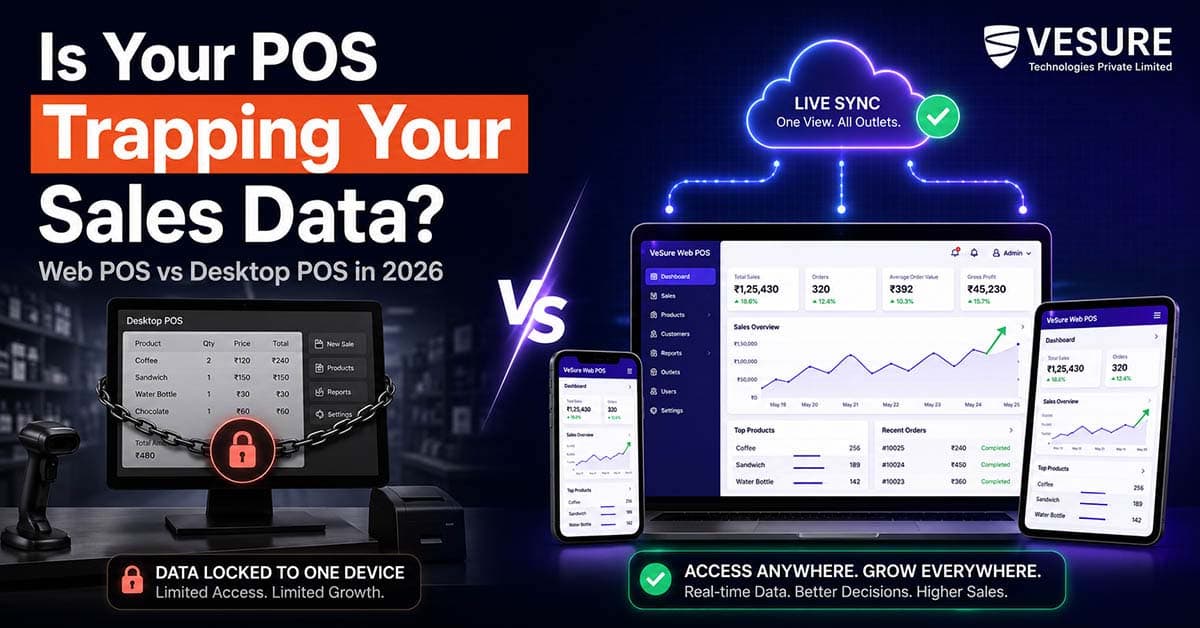
This one pains me as you run more than one outlet: sales occur at the counter, but the digits reach you only after someone physically reports them or when you walk in and check the machine yourself. A desktop Point of Sale (POS) locks all your billing history to a single computer, in one location. A web-based POS does not.
Quick Answer: Web-based POS software works and lives in a browser, with billing, inventory, and sales data completely on the cloud- so an owner can see each outlet performing on their phone or laptop instantly.
Desktop POS - Stores everything locally on one machine (data stuck to the counter) and needs to be exported and imported manually between outlets. POS is the most workable architecture in 2026 for a retail business with more than one location or that plans on opening more locations.
What Is the Real Difference Between Web POS and Desktop POS?
“Look and Feel” is not the big difference here. This is about where the data resides.
Desktop POS Software: Desktop software is installed directly on a computer at the billing point. Every sale, every stock update, and the closing report for each day are fed to the local machine database of that machine.
If the machine freezes, or an uninterruptible power supply is not redirected correctly when a storefront loses power at closing time, and a backup has never run, then that information could escape. This is installed via your second outlet, and runs separately on its own database; it will not speak to this installation unless you tell it to.
Web – This POS software type runs on a browser (Chrome, Edge, or a Tablet) and is connected to the central Cloud database. The billing counter only serves as a front end, while the real sales count, inventory numbers, and customer data stay secured on servers that are frequently updated within minutes of a bill being generated. All these outlets write to a common underlying system.
What Happens Without Real-Time Visibility Across Outlets?
Most retail owners with 2–3 outlets do not realize how much this costs them until they try to make a decision quickly. A supplier calls offering a bulk discount on a fast-moving item, but the owner can not say, right now, how much stock sits across all three stores combined. A manager at one branch reports a slow week, but the owner has no way to compare that against the other branches without asking each one to manually send a report.
Desktop-tied billing also creates a single point of failure. If the local machine’s hard drive fails, recovering sales history depends entirely on whether someone remembered to back it up and how recently. For a business owner who wants to step back from being at the counter every day, this is the exact friction that keeps them from doing that.
Why Cloud-Based Billing Solves This Differently
A cloud-based POS removes the “One Machine, One Location” constraint in three specific ways:
- Live consolidated reporting. Sales, stock levels, and daily closing reports update centrally the moment a bill is punched, so an owner sees combined numbers across every outlet without asking anyone.
- Remote access from any device. Because the software runs in a browser, an owner can log in from a phone at home, a laptop while travelling, or a tablet at a new location being scouted - no VPN, no remote desktop software, no physical presence required.
- Automatic data backup. Cloud storage removes the “Did the Backup Run Last Night” question entirely. Data is written to the server as it happens.
None of this makes web POS “fancier; it makes the billing counter and the owner’s decision-making run on the same live data, instead of a delayed copy of it.
How VeSure Web POS Applies This for Indian Retailers
VeSure’s Web POS is built specifically around the multi-outlet reality of Indian retail where a store owner is often managing a second or third location while still handling day-to-day operations at the first.
It runs entirely in a browser, so there’s no dependency on a specific machine or operating system version at each counter. Sales, inventory movement and GST-ready invoices sync in real time across every registered outlet, giving the owner one consolidated dashboard instead of separate reports per store.
Stock counts update the moment an item is billed at any location, which matters for retailers who transfer inventory between outlets based on what’s moving. Digital payment acceptance UPI, cards, wallets- is built into the same billing screen, so the switch from desktop to web doesn’t mean losing payment flexibility.
For an owner managing outlets in different parts of the same city, or even different cities, this is the difference between checking one dashboard once and calling three different store managers to piece together the same picture.
Real Scenario: A Two-Outlet Apparel Retailer Choosing Between the Two
Consider an apparel retailer running one established store and a newer second outlet opened six months ago. On desktop billing software, closing each day meant two separate reports arriving by WhatsApp from two managers, sales figures that had to be manually added together, and stock discrepancies that only surfaced when a customer asked for a size the system said was available but was not, because inventory hadn’t been reconciled between locations in days.
Moving to a web-based system changes that pattern immediately. Both outlets bill into the same live database. If outlet one is low on a fast-moving size and outlet two has surplus, the owner sees it on one screen and can plan a transfer before the stock-out happens at either counter, instead of finding out after a sale is lost.
What to Look for When Choosing Web POS Software
Not every “Cloud POS” claim delivers real-time sync. Before committing, an owner should check for:
- Genuine real-time updates - not batch syncing every few hours, which defeats the purpose.
- GST-ready billing built into the core system, not a bolt-on add-on.
- Offline resilience - the ability to keep billing during a brief internet outage, with automatic sync once connectivity returns.
- Multi-outlet reporting as a native feature, not something requiring a separate module or upgrade.
- Device flexibility - works on the browsers and devices already in use at the counter, without forcing new hardware.
Conclusion
The desktop-vs-web decision is not about which software “Looks Modern.” It is about whether your billing data can answer the question “How Is My Business Doing Right Now, Across Every Location” without someone manually assembling that answer for you. For a single-counter shop with no plans to expand, desktop billing can still work.
For anyone managing more than one outlet or planning to expand, a web-based architecture removes the manual reconciliation that desktop systems force onto the owner.
Frequently Asked Questions
Is web-based POS software reliable during internet outages in India?
A properly built web POS, including VeSure POS, includes offline billing modes that let the counter keep working during a brief connectivity drop. Transactions queue locally and sync automatically once the connection is restored, so a short outage doesn’t stop billing.
Does web POS cost more than desktop POS software?
Prices vary by vendor, but many web-based POS providers offer a subscription including updates and even cloud storage and support, meaning that the need for backup infrastructure or IT maintenance that desktop systems often entail, in addition to the cost of their licence, is virtually removed.
Can I use web POS software on a tablet instead of a computer?
Yes. Because web-based POS runs through a browser, it can operate on tablets, laptops and desktop computers, making it ideal for mobile counters or pop-up stores as well as fixed-point shopfronts.
How does web POS handle GST billing across multiple outlets?
A cloud POS applies GST rules centrally, so tax slabs and invoice formats stay consistent across every outlet without each location’s counter needing separate configuration or manual updates.
Is switching from desktop POS to web POS a difficult migration?
Most vendors, including VeSure, support data import from existing billing systems, so historical sales, inventory, and customer records can move over rather than starting from zero. The switch itself typically takes a few days of parallel setup before going fully live.
Get Started
If billing data locked to one machine is slowing down how fast you can react across outlets, explore VeSure Web POS or book a demo to see real-time multi-outlet billing in action.