
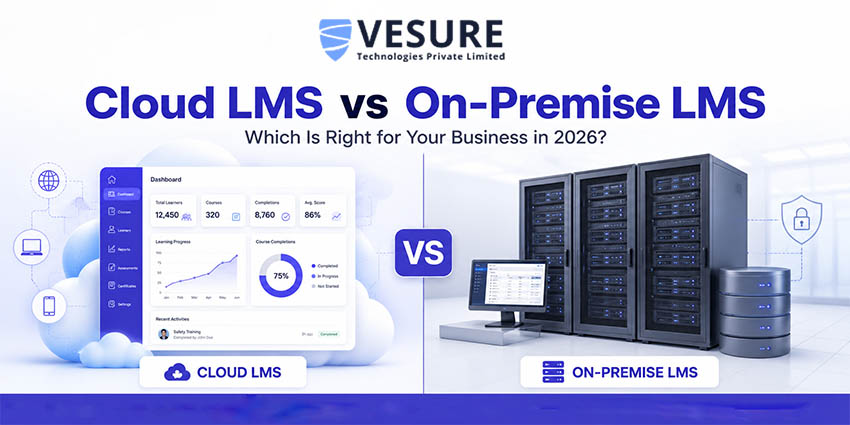
Choosing an LMS for your business is not just a software decision. It is a five-year commitment that shapes how your employees learn, how your training data is stored, how quickly you can roll out new courses, and how much your IT team has to handle every week.
The first real question is rarely about features. It is about where the system lives in the vendor's cloud or on servers your company owns. Both are valid choices, but they suit very different kinds of businesses. This guide breaks down the real differences, when each one actually makes sense, and how Indian businesses are making the call in 2026.
Table of Contents
- What is a Cloud-Based LMS?
- What is an On-Premise LMS?
- Cloud LMS vs On-Premise LMS Side-by-Side Comparison
- Detailed Comparison Across 6 Factors
- When Cloud LMS is the Right Choice
- When On-Premise LMS Still Makes Sense
- VeSure LMS Cloud-Based LMS Built for Indian Businesses
- Real Use Cases Across Industries
- Common Mistakes to Avoid While Choosing an LMS
- Frequently Asked Questions
What is a Cloud-Based LMS?
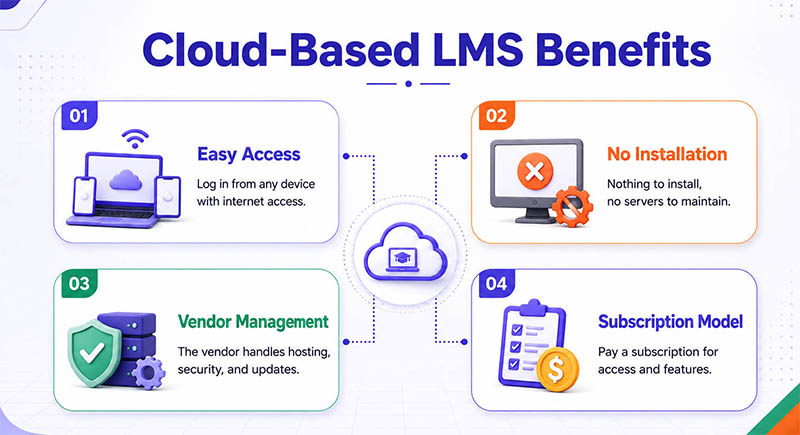
A cloud-based LMS is hosted on the vendor's servers and accessed through a web browser. There is nothing to install, no servers to maintain, and no IT team needed to manage updates. Your users, employees, learners, and trainers simply log in from a browser or mobile device, anywhere they have internet.
The vendor handles everything behind the scenes: hosting, security patches, feature updates, backups, and scalability. You pay a subscription, usually monthly or annually, and use the platform like you would Gmail or Zoom.
What is an On-Premise LMS?
An on-premise LMS is installed on servers your company owns and runs from inside your own infrastructure. Your IT team handles installation, maintenance, security, updates, and backups. Access is usually restricted to your internal network or requires a VPN.
This model gives you complete control over where your data lives and who can access it. The trade-off is high upfront cost, ongoing IT effort, and slower rollout of new features. It is still a valid choice for organizations with strict data residency rules or specialized compliance requirements.
Cloud LMS vs On-Premise LMS: Side-by-Side Comparison
Here is the quick view before we go into detail.
| Factor | Cloud-Based LMS | On-Premise LMS |
| Upfront cost |
Low subscription-based (monthly or yearly) |
High servers, licenses, and IT setup |
| Setup time |
Days, sometimes hours |
Weeks to months |
| Maintenance |
Handled by the vendor |
Managed by the in-house IT team |
| Updates |
Automatic, no downtime |
Manual, scheduled by IT |
| Scalability |
Add users instantly |
Hardware upgrades required |
| Accessibility |
Anywhere, any device, browser-based |
Restricted to network or VPN access |
| Data control |
Hosted by vendor, with SLAs |
Full control inside your servers |
| Security responsibility |
Shared vendor + business |
Entirely with your IT team |
| Best for |
SMEs, startups, multi-location, remote teams, EdTech |
BFSI, defense, and regulated sectors with strict data policies |
Detailed Comparison Across 6 Critical Factors
1. Cost
Cloud LMS runs on a subscription model, usually a fixed monthly or annual fee based on user count. There is no hardware to buy, no licenses to track, and the IT cost stays predictable.
On-premise LMS requires upfront investment in servers, software licenses, installation, and ongoing IT support. The total cost of ownership over five years often turns out higher than expected once maintenance, hardware refreshes, and IT salaries are factored in. For most SMEs and growing businesses in India, cloud LMS wins on cost flexibility.
2. Setup and Deployment Time
Cloud LMS rollout typically takes days. Sign up, configure roles and branding, upload your first courses, and you're live. New users can be added instantly.
On-premise LMS deployment can take weeks to months, including server provisioning, software installation, testing, integrataion with internal systems, and security configuration. If you need training up and running this quarter, the cloud is the realistic choice.
3. Scalability
Cloud LMS scales the moment you need it to. Adding 100 new users for a sudden onboarding push is a configuration change, not a project.
On-premise systems hit physical limits: server capacity, license caps, and network bandwidth. Scaling means buying more hardware or upgrading licenses, often with downtime in between. For fast-growing companies, that friction adds up.
4. Security and Compliance
Cloud LMS vendors invest heavily in security, encrypted data at rest and in transit, regular penetration testing, ISO 27001 and SOC 2 certifications, and dedicated security teams. For most businesses, this exceeds what they could build in-house.
On-premise security depends entirely on your IT team's expertise and resources. It can be excellent, but it costs significantly more to maintain at that level. The exception is industries with data residency mandates, such as government, defense, and BFSI, where data must legally stay inside your own infrastructure.
5. Maintenance and Updates
Cloud LMS handles updates automatically and without downtime. Your team always works on the latest version with the newest features.
On-premise updates are manual events scheduled by your IT team, tested in staging, deployed during maintenance windows, and often skipped or delayed because the work is significant. Over time, on-premise systems tend to fall behind on features and security patches.
6. Accessibility and Remote Learning
Cloud LMS is built for distributed teams. Employees can complete training from home, on the road, on their phones, or after work without VPN or special access.
On-premises systems usually require VPN or office network access. For organizations with field staff, multi-location teams, or hybrid work setups, this becomes a real barrier to completion rates.
When Cloud LMS is the Right Choice
Choose cloud LMS if any of these describe your business:
- You need to launch training quickly within weeks, not quarters.
- Your team is distributed across multiple locations or works remotely.
- You prefer predictable monthly costs over large upfront capital investment.
- You do not have a dedicated in-house IT team for LMS maintenance.
- You expect user numbers to grow, new hires, new branches, and new courses.
- You want access to the latest features without managing upgrades yourself.
For Indian SMEs, mid-market companies, EdTech businesses, coaching institutes, retail chains, and most service companies, cloud LMS is now the default choice and for good reason.
When On-Premise LMS Still Makes Sense
On-premises is not obsolete. It still fits certain businesses better:
- Strict data residency requirements mandated by your industry regulator (BFSI, defense, certain government departments).
- Highly customized integration with internal legacy systems that cannot expose data externally.
- Strong in-house IT capability already in place, with budget allocated for ongoing maintenance.
- Preference for one-time perpetual licensing over recurring subscription costs for accounting or capex reasons.
Honest assessment: most growing Indian businesses do not fall into these buckets. If you do, on-premise is a legitimate choice. If you don't, the cloud will serve you better.
VeSure LMS: Cloud-Based LMS Built for Indian Businesses
VeSure LMS is a cloud-based learning management system designed for Indian businesses' corporate L&D teams, EdTech founders, coaching institutes, schools, manufacturing training departments, and IT services firms. It gives you the operational flexibility of cloud, without the cost or complexity of enterprise platforms designed for the United States or European markets.
What VeSure LMS gives your business:
- Course creation and management upload videos, documents, presentations, and run live classes from a single dashboard.
- Quizzes, assessments, and auto-grading so learning outcomes are measurable, not just attendance.
- Certification and completion tracking with auto-generated certificates and expiry monitoring.
- Multi-instructor support for training teams with multiple trainers, department heads, or subject experts.
- Student and employee progress monitoring across modules, courses, and skill paths.
- E-commerce capability for EdTech businesses and institutes that want to sell courses online.
- HRMS integration, when used with VeSure HRMS, training data connects to appraisals, promotions, and workforce planning.
VeSure Technologies is CMMI Level 3 and ISO 27001 certified, which means your training data, learner records, and assessment scores are handled with internationally recognized security standards, even though the platform runs in the cloud.
Real Use Cases: How Indian Businesses are Using Cloud LMS
EdTech Startup in Bengaluru
A growing EdTech company offering professional certification courses was using a basic on-premise LMS that crashed every time a course launch went live. After moving to a cloud-based LMS, traffic spikes stopped being a problem. New course launches happen on schedule, learners get a smoother experience, and the founding team stops spending weekends fixing server issues.
Manufacturing Company in Pune
A mid-sized auto-components manufacturer with 400+ shop-floor workers needed to deliver safety and process training across two plants. An on-premise solution would have required network setup at both locations. With cloud LMS, supervisors push training to workers on shared devices and tablets. Completion rates went up because access stopped being a barrier.
Coaching Institute Chain in Delhi NCR
A multi-branch coaching institute wanted to offer recorded classes, online tests, and certification to students across branches. Cloud LMS gave them a unified platform that their students could access from home, branch computers, or mobile phones. Selling additional online-only courses to alumni opened up a new revenue line they couldn't run on legacy infrastructure.
Common Mistakes Businesses Make While Choosing an LMS
- Choosing on-premise out of habit. If your business does not have a regulatory reason for it, the operational cost rarely justifies the trade-off.
- Comparing only license costs. The true cost of on-premise includes hardware, IT salaries, upgrades, and downtime, most of which get missed during evaluation.
- Skipping security due diligence on cloud vendors. Cloud is secure when the vendor is serious about security. Always check certifications like ISO 27001 before signing up.
- Ignoring mobile access. Field teams, shop-floor workers, and remote employees mostly learn from phones. An LMS without a strong mobile experience leaves them out.
- Not planning for integration. An LMS that does not talk to your HRMS or CRM eventually becomes a data island. Plan integration from day one.
Final Thoughts
The cloud vs on-premise debate is mostly settled for the majority of businesses in India. Unless your industry forces you to keep data inside your own walls, cloud LMS delivers more value, faster rollout, lower cost, easier scaling, better security, and continuous improvement without IT effort.
The real question is not which model is better in general. It is the model that fits how your business operates, where your learners are, and what your IT capacity actually looks like.
If you are evaluating LMS options for your business, explore VeSure LMS or book a free demo to see how it fits your training requirements before you decide.
Frequently Asked Questions
What is the main difference between cloud LMS and on-premise LMS?
Cloud LMS is hosted by the vendor and accessed through a browser, with the vendor handling maintenance, updates, and security. An on-premise LMS is installed on your company's own servers and managed entirely by your internal IT team. Cloud offers flexibility and speed; on-premise offers full data control.
Is cloud-based LMS secure for business data?
Yes, when the vendor takes security seriously. Reputable cloud LMS providers offer encrypted data storage, regular backups, ISO 27001 certification, and SOC 2 compliance. For most businesses, cloud security exceeds what they could build and maintain internally. Always check security certifications before choosing a vendor.
Which LMS is better for remote and hybrid teams?
Cloud LMS is better for remote and hybrid teams. Learners can access training from any location, on any device, without VPN or office-network requirements. On-premise systems usually require network or VPN access, which becomes a barrier for distributed teams.
How much does a cloud LMS cost in India?
Cloud LMS pricing in India typically runs on a per-user-per-month subscription. Entry-level plans for small teams start affordably, while feature-rich plans for larger businesses scale based on user count and features. Compared to on-premise costs (servers, licenses, IT support), cloud LMS is usually significantly more economical over a 3-5 year horizon.
Can a cloud LMS integrate with HRMS and other business software?
Yes. Modern cloud LMS platforms like VeSure LMS integrate with HRMS systems, so training records connect to employee profiles, appraisals, and payroll. Some platforms also integrate with CRMs and customer support systems, making it possible to track training across employees, partners, and customers in one connected workflow.
When should a business choose an on-premise LMS over a cloud LMS?
Choose on-premise LMS when your industry has strict data residency requirements (BFSI, defense, certain government sectors), when you need deep integration with internal legacy systems that cannot expose data externally, or when you have strong in-house IT capability and prefer one-time licensing over subscription cost. For most other businesses, cloud LMS is the better choice.

.png)
.png)